
How to add Availability & Opening Hours
Adding your availability or opening hours is not only very easy to do. But it also shows users browsing your listings if you could suitable for them. By that, I mean for example if your an escort and someone only have limited time they can get away to meet with you. Then if you have your availability set, they can see straight away if you are likely to be available during that time. Moreover, this also saves you getting messages about your availability. The same goes to those listing services and business with us, promoting your opening hours is very useful.
Please note: Availability/opening hours are only shown for listings in certain categories. So if you do not see it on the add listing form, that is why.
Fact: People who add their availability get a lot more responses and interest in their ads. This is because one of the search options for our users, is to search only listings that are available/open now! So its well worth taking the time to add yours and keep it up-to date!
How to add your availability to your listing.
You can add the availability at the time you create a listing or you can edit your listing later to add it. See our doc on how to edit your listing for more information on that at: How to Manage Your Listings. For either process it is the same.
On your listing you will see the availability option, it will look like the screenshot below:
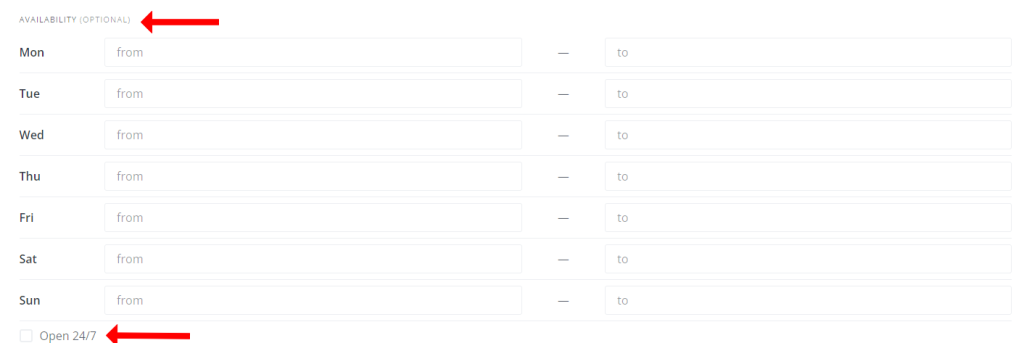
You simple fill out the availability for each day. If your not available on any day, then just leave it blank. If you are available 24/7 then just tick the box at the bottom next to open 24/7 as in the screenshot above. If you tick this box, then you do not need to fill out and of the times next to the days.
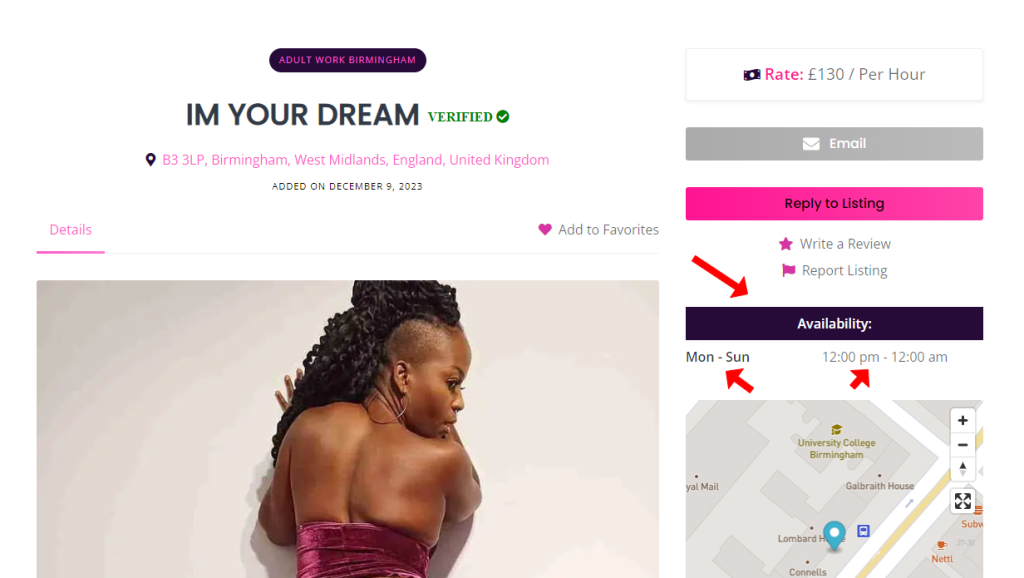
Once you complete these fields, you will now have availability/opening times shown on your listing as shown in the screenshot below.
Remember if your availability changes, you can just edit your listing to update it in the same way.
Online bookings
The availability is separate to online bookings. You will need to setup your online booking calendars separately. For details on accepting online bookings and how to set this all up. Please see the documentation here: How To Set Up Online Bookings

 2 out of 3 people found this useful