
How To Respond To A Listing
There are many ways in which you can respond to a listing. The exact options depend on what contact options the listing owner has applied.
At the very least there is the option to reply to the listing, as shown in the screenshot below:
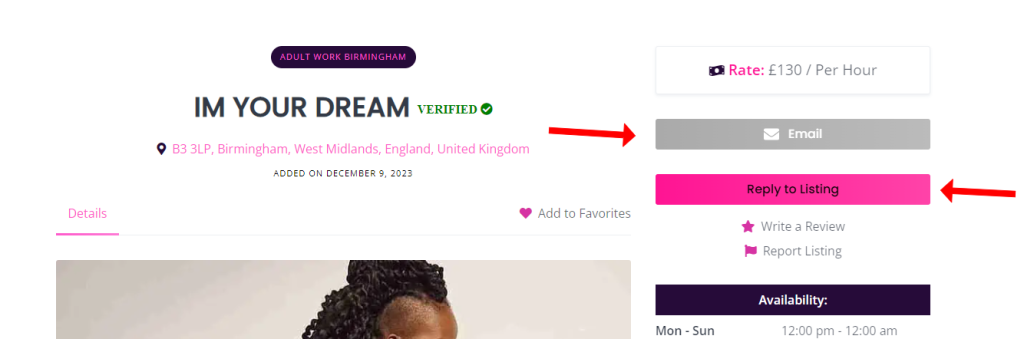
When you click reply to listing, you will be able to send the listing owner a message though our internal messaging system. You can access our internal messaging system as explained here: How to respond to messages
The other contact options the listing owner has entered information for, are also shown above the reply to listing option. As you can see in the screenshot below, there is an email option available too. Listings can include all number of contact options, including a phone number if entered. You can choose the best and most discreet option for you.
Collaborator Contact Options
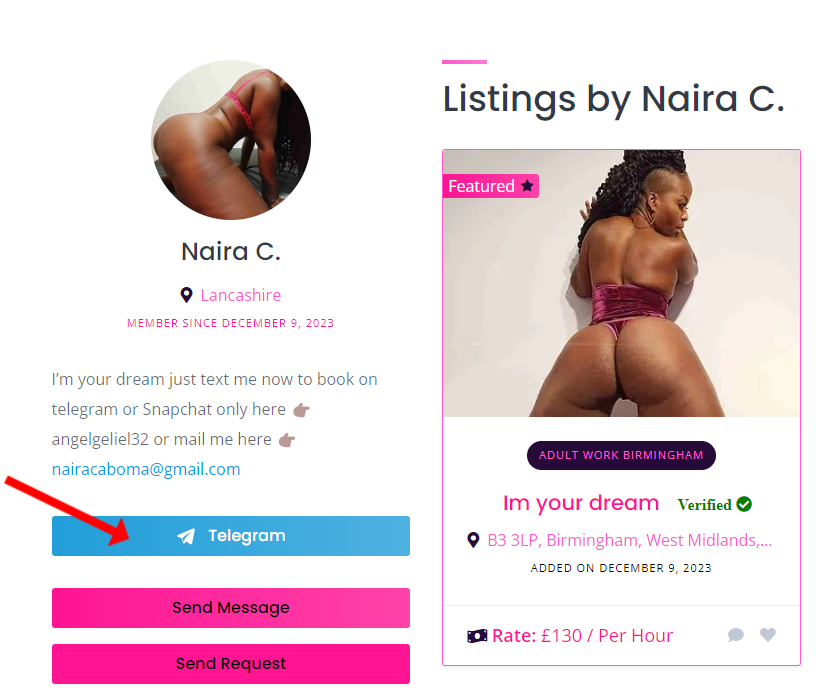
Sometimes collaborators (Listing owners) also set contact details on their collaborators profiles that they do not have on their listings. You can access their profile by either clicking their name on the listings details pages. Or by accessing them directly from the collaborators page.
In the screenshot below is an example of a collaborators profile, where you can see they have the option to contact them by Telegram, which is not present on their actual listings. Furthermore, they also list a snapchat ID in their profile Bio.

 0 out of 0 people found this useful